

Per qualsiasi sala giochi o centro di intrattenimento per famiglie (FEC), il tempo di funzionamento delle macchine è direttamente collegato al fatturato. Una macchina guasta non solo comporta una perdita di monete, ma riduce la soddisfazione dei clienti e può persino danneggiare la reputazione del locale. Saper come effettuare la manutenzione delle macchine arcade è una competenza essenziale per qualsiasi gestore commerciale che desideri proteggere il proprio investimento e garantire un reddito costante.
Questa guida offre un approccio strutturato alla manutenzione delle macchine arcade, dalla pulizia quotidiana ai controlli tecnici a lungo termine.
Perché la manutenzione regolare è importante
Le macchine arcade sono apparecchiature complesse, dotate di componenti elettronici sensibili, schermi ad alta definizione e parti meccaniche che gestiscono migliaia di interazioni ogni mese. Nel tempo, polvere, calore e usura fisica possono causare guasti ai componenti.
Una manutenzione regolare aiuta a:
- Prolungate la durata di vita delle vostre macchine.
- Ridurre il costo delle riparazioni costose.
- Garantire un'esperienza sicura e piacevole per i giocatori.
- Massimizza il potenziale di guadagno giornaliero del tuo locale.
Lista di controllo per la manutenzione giornaliera
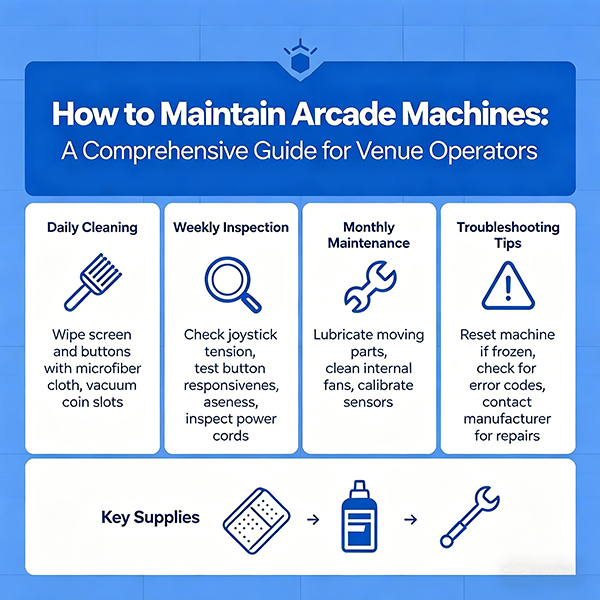
La manutenzione quotidiana è la prima linea di difesa contro l'usura delle macchine.
1. Pulizia delle superfici
Utilizza un panno morbido e non abrasivo per pulire schermi, pulsanti, joystick e superfici del case. In questo modo rimuoverai impronte digitali e macchie che potrebbero rendere la macchina poco attraente.
2. Test funzionali
Inizia ogni giornata con una partita veloce o utilizzando la "Modalità di prova" per assicurarti che tutti i pulsanti, le fessure per le monete e i distributori di biglietti funzionino correttamente.
3. Ispezione visiva
Verificate la presenza di parti allentate, cavi danneggiati o qualsiasi comportamento anomalo dell'illuminazione. Individuare un piccolo problema oggi può prevenire un guasto più grave domani.
Attività di manutenzione settimanali e mensili
Sono necessari controlli più approfonditi per garantire che i componenti interni funzionino correttamente.
1. Polvere e raffreddamento
La polvere è nemica dei dispositivi elettronici. Utilizzare aria compressa o una spazzola morbida per pulire le ventole interne, gli alimentatori e i circuiti stampati. Assicurarsi che l'apparecchio abbia spazio sufficiente intorno per una corretta ventilazione.
2. Lubrificazione delle parti meccaniche
Per le macchine con parti mobili (come le macchine a pinza o i simulatori), verificare che il movimento sia fluido e, se necessario, applicare il lubrificante raccomandato dal produttore a binari e ingranaggi.
3. Verifica dei connettori e dei cavi
Nel tempo, vibrazioni e calore possono allentare i connettori interni. Assicurarsi con cura che tutti i cavi siano saldamente inseriti nelle rispettive porte sulle schede madri e sugli alimentatori.
Risoluzione dei problemi comuni delle macchine arcade
Anche con un'attenta manutenzione, possono sorgere dei problemi. Saper come effettuare la manutenzione delle macchine arcade include la capacità di risolvere i problemi di base:
- Nessuna alimentazione: Controllare il fusibile, il cavo di alimentazione e l'alimentatore interno (PSU).
- Schermo nero: Verificare il cavo di segnale tra la scheda e il monitor.
- Errore moneta/biglietto: pulire i sensori o verificare la presenza di inceppamenti nel meccanismo fisico.
- Pulsante non funzionante: Controllare il microinterruttore e il cablaggio.
L'importanza dei ricambi di alta qualità
Quando un componente deve essere sostituito, utilizzare sempre ricambi di alta qualità che corrispondano alle specifiche del produttore originale. L'utilizzo di ricambi economici e non standard può causare ulteriori danni o addirittura rappresentare un rischio per la sicurezza.
Un produttore affidabile dovrebbe fornire:
- Un elenco chiaro dei pezzi di ricambio.
- Manuali tecnici e schemi elettrici.
- Assistenza post-vendita tempestiva per la risoluzione dei problemi.
Conclusione
Saper come effettuare la manutenzione delle macchine arcade è ciò che distingue gli operatori di successo da quelli che lottano con continui tempi di inattività. Adottando una routine di manutenzione costante e collaborando con un fornitore professionale, potrete mantenere le vostre macchine in funzione senza intoppi e fidelizzare i vostri clienti.